The Marketers Playbook: Path to Personalized Digital Experiences
Jul 07, 2026 • 1 Minute Read • Stephanie Saia, Personalization & Optimization Practice Lead


Schema markup, also known as structured data, is a powerful tool that helps search engines better understand and categorize the content on your website. By implementing schema, you provide detailed information about your business, products, services, and other key areas, making it easier for search engines like Google to index your website accurately.
The most widely used method for adding schema markup today is through JSON-LD (JavaScript Object Notation for Linked Data). With JSON-LD, schema is embedded in your site or application using a <script> tag, enabling enhanced search features such as rich snippets, improved visibility in search results, and increased click-through rates.
Standing out in both traditional search and voice search results is essential for modern search engine optimization (SEO) and answer engine optimization (AEO) and leveraging structured data gets you there.
Schema markup is an essential SEO tactic that enhances your website’s visibility in Google’s search engine results pages (SERPs). By implementing structured data, you enable the display of rich snippets—such as ratings, FAQs, and event details—which can increase click-through rates and drive more targeted traffic to your site.
While schema markup is just one component of a comprehensive digital marketing strategy, its primary benefit lies in helping search engines accurately interpret and index your website’s content. Using schema markup not only boosts your SEO performance but also supports better answer engine optimization (AEO), making your content more accessible for voice search and AI-powered search experiences.
Schema.org was established in 2011 by Google, Microsoft, Yahoo, and Yandex to create a unified standard for structured data on the web. Its primary goal is to standardize HTML tags and microdata to help search engines better interpret and categorize website content, supporting the broader vision of the semantic web project to make data more accessible and meaningful for both humans and machines. By providing a shared vocabulary for structured data, Schema.org enables search engines to deliver richer, more relevant search results and enhances the visibility and understanding of web content
While sites do not have to use every type of Schema on their website, many common Schema types can be applied to different kinds of businesses.
Consider the following commonly used types of Schema:
While this is a shortened list, the full list of schema types can be found on Schema.org.
Choosing the right schema starts with the page; the goal is to describe what the page is primarily about and connect that information to the broader organization and website.
Use this five-step process for each important page template:
Is it an article, product detail page, service page, location page, event page, job posting, or something else? Start with the main reason the page exists.
Select the Schema.org type that best describes the page’s primary subject. For example, use Article or BlogPosting for an editorial article, Product for a product detail page, Service for a service offering, Event for an event, or LocalBusiness for a physical location.
Only mark up details that users can find on the page, such as the name, description, author, price, location, date, or availability. Schema should represent the page, not add claims that are hidden or unsupported.
A page can describe more than one connected entity. An article can include an author and publisher; a product can include an offer, brand, or review; and a service can identify its provider. Use supporting types when the relationship is real and the information is maintained accurately.
Each indexable URL should be represented as a WebPage and connected to the organization using stable identifiers. The page-specific type sits on top of that foundation; it does not replace it. We will explain how to build a sitewide schema foundation in the next section.
A simple way to think about the decision is:
Not every page needs every type. A homepage may primarily use WebPage and Organization markup; an insight may use Article or BlogPosting in addition to WebPage; and a product page may use Product, Offer, and Brand when those details are present. The right implementation is the smallest accurate set of types that clearly describes the page and its relationships.
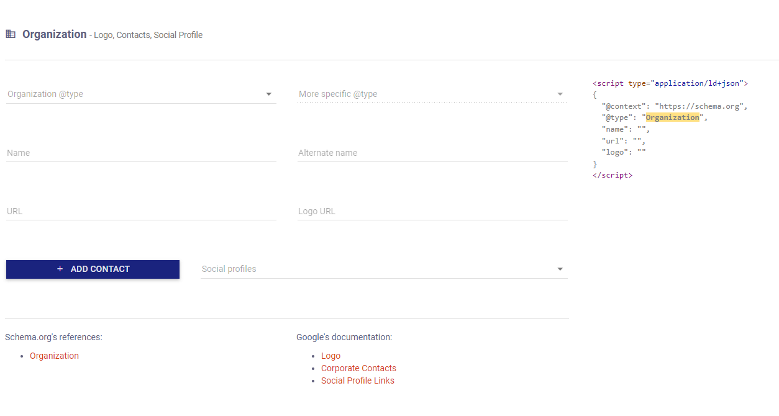
Fortunately, not all schema markup has to be hand-coded. There are some powerful and beneficial tools to help you. Merkle has its Schema Markup Generator tool with fields ready to plug in.
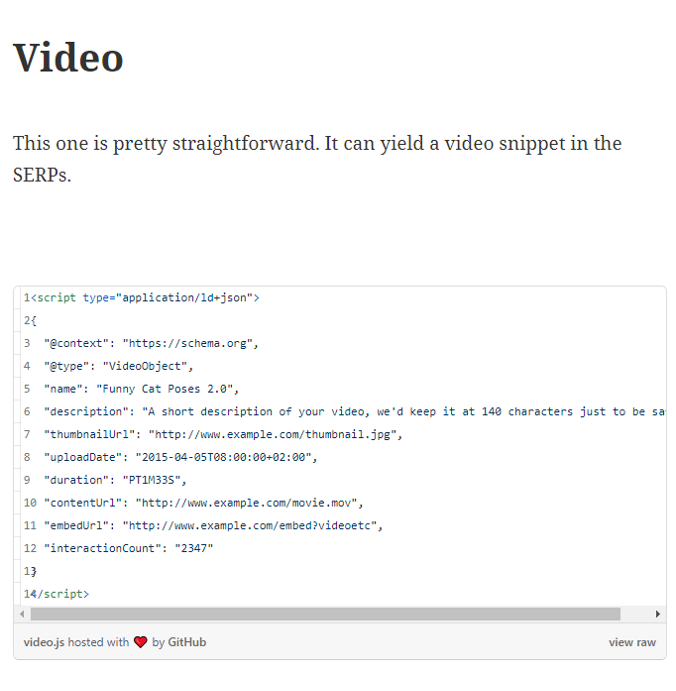
Also, Steal Our JSON-LD has some great examples that can be updated to fit your organization’s needs.
Before adding schema for individual pages, establish a consistent foundation across your site templates. For most organizations, that foundation should include Organization and WebPage markup, connected with stable identifiers.
Organization describes the business or entity behind the website. Use it to communicate consistent, verifiable information such as the organization’s name, canonical website URL, logo, relevant social or external profiles, and contact information when those details are accurate and publicly available. Choose a more specific subtype when it genuinely applies, such as Corporation, EducationalOrganization, or LocalBusiness.
WebPage describes the individual URL being crawled. It can identify the page’s canonical URL, name, description, primary image, and relationship to the broader website and organization. A WebPage node should be generated dynamically from the page template so that each indexable URL receives accurate, page-specific values.
The goal is to define one consistent organization entity with a stable @id, and reference that entity from your page-level markup. This creates a connected schema graph and reduces the risk of conflicting business names, logos, URLs, or social profiles across the site.
A basic sitewide implementation might look like this:
<script type="application/ld+json">
{
"@context": "https://schema.org",
"@graph": [
{
"@type": "Organization",
"@id": "https://www.example.com/#organization",
"name": "Example Company",
"url": "https://www.example.com/",
"logo": "https://www.example.com/assets/logo.png",
"sameAs": [
"https://www.linkedin.com/company/example-company"
]
},
{
"@type": "WebPage",
"@id": "https://www.example.com/about/#webpage",
"url": "https://www.example.com/about/",
"name": "About Example Company",
"isPartOf": {
"@id": "https://www.example.com/#website"
},
"about": {
"@id": "https://www.example.com/#organization"
}
}
]
}
</script>
Thankfully there are some great tools for testing your schema both before and after implementation.
Google has the Rich Results Test where you can either enter a URL to test or paste in the code directly. Additionally, Schema.org has its own validator.
These are the basics of schema implementation but there is much more that could be done by using other existing schema types that fit your organization or creating and testing a custom schema markup. The use of schema continues to change over time and providing the search engines with updated, accurate information can only help your brand or organization.